Sell money orders to Capital City Bank (CCB) clients only. Clients who purchase money orders with cash items or on-us checks, you can send to the teller line for processing. Otherwise, issue money orders to clients by completing Checking/Savings Debit Memo tickets. For applicable fees, see the Other Services and Fees brochure.
If you are reissuing a money order after a stop payment was placed, E-mail _ESRecon Group to verify the money order has not been paid. Note: Clients must wait a minimum of 3 business days after the stop payment is placed before a replacement money order can be issued.
To issue a CCB money order using a Checking/Savings Debit Memo ticket, do the following:
- Determine the identity of the client in person.
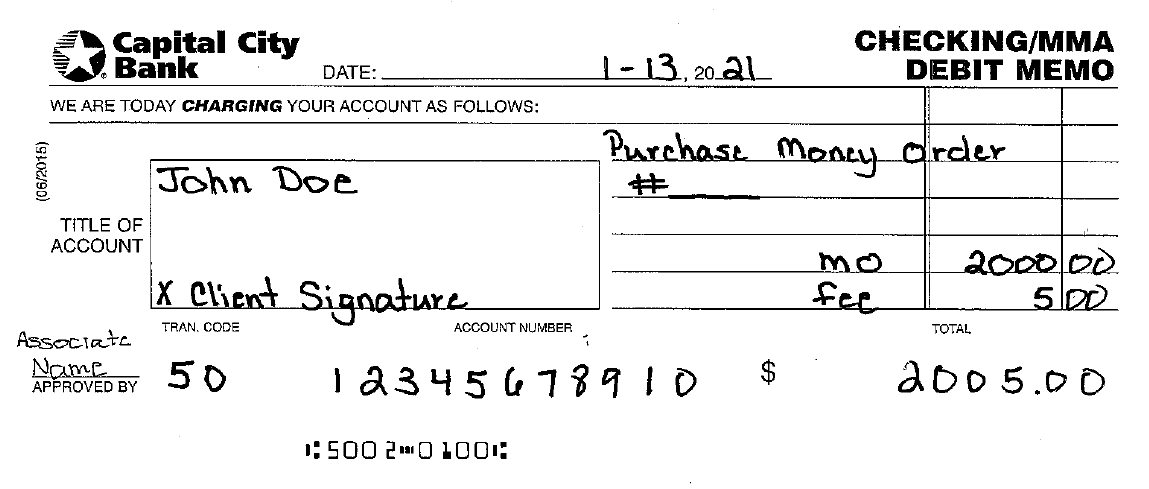
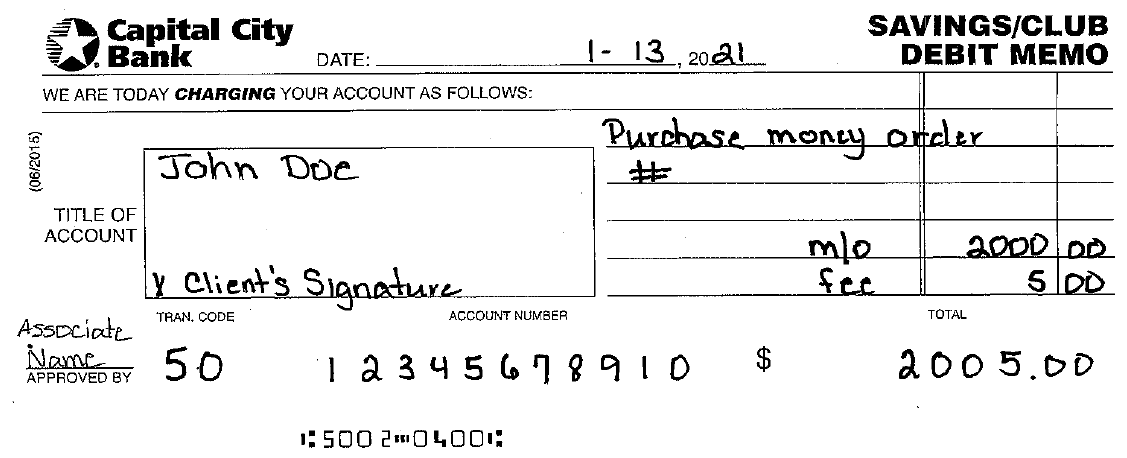
- Complete the following information legibly on the appropriate debit memo ticket:
- Date
- Title of account - purchaser name
- Client signature
- Money order number
- Amount of money order
- Fee
- Approved by - associate name
- Account number
- Total
Checking Debit memo example
Savings Debit memo example
- Complete the following information on the Official Check Fees General Ledger Credit memo (pink):
- Date
- Money order number
- Offset entry - write debit memo
- Associate name
- Office number
-
General ledger account number xxx 460450 6315 000
- Note: Clients with a Private Client checking account are not charged a fee for Cashier’s Checks.
- In Xperience > Products > Teller > Teller Menus > CCB Supervisor Menu > Print a Check.
- Choose M2 Money Order then click Select.
- In the Amount field, enter the amount of the money order.
- In the Payee field, enter the payee name. Note: A money order is not required to have a payee and can be sold with the Payee field blank.
- In the Remitter (purchaser) field, click the ellipsis
 and enter the client's last name, first name, account number, Tax ID, or CIF.
 - Click OK. The client name displays in the Work with Person Items section.
- Click the remitter's name and then click OK.
- From the Bank Customer drop-down menu, choose Yes.
- Load the money order paper into the appropriate printer.
- Click Print.
- Ensure the client reviews the money order for accuracy.
- If the money order is for bank use (for example: close account payout, loan proceeds), an authorized associate signs the signature line and includes his/her 4-digit employee ID# beside his/her signature. See Official Bank Check Signature Authorization procedures.
- If an authorized associate signature is not required, have the client sign the printed money order on the signature line.
- Tear off the top portion of the money order (credit copy).
- Give the client the original money order and client copy (center and bottom portion).
- Stack the Official Check Fee GL Credit memo, the money order credit copy, and the Checking/Savings debit memo, and place them in the teller work to run.
